

Tutorial: multi-category scraping (webscraper.io)
webscraper.io/test-sites is a set of scraping sandboxes maintained by the Web Scraper browser-extension team. Its pagination test site is a used-car marketplace with three brand listings — BMW, Ferrari and Jaguar — each with numbered page links and a rich detail page per car (price, specs, seller info).
That makes it the perfect third tutorial: one robot that crawls multiple categories (--search-filters), follows numbered pagination (link_list, unlike the "next" link the books site used), scrapes detail pages (--get-detail), and downloads each car's photo. And unlike a lab exercise, this walkthrough keeps two rough edges the first run actually produced — and shows how reading the output catches both.
Everything below is real output from running the commands against the live site.
Docker vs. local
As in the other tutorials, prefix each command with docker compose run --rm when using the reference Docker stack. This page shows that form, since the console output was captured there.
Step 1 — One robot, three categories
The three listings share one URL pattern:
https://webscraper.io/test-sites/pagination/BMW
https://webscraper.io/test-sites/pagination/Ferrari
https://webscraper.io/test-sites/pagination/Jaguar
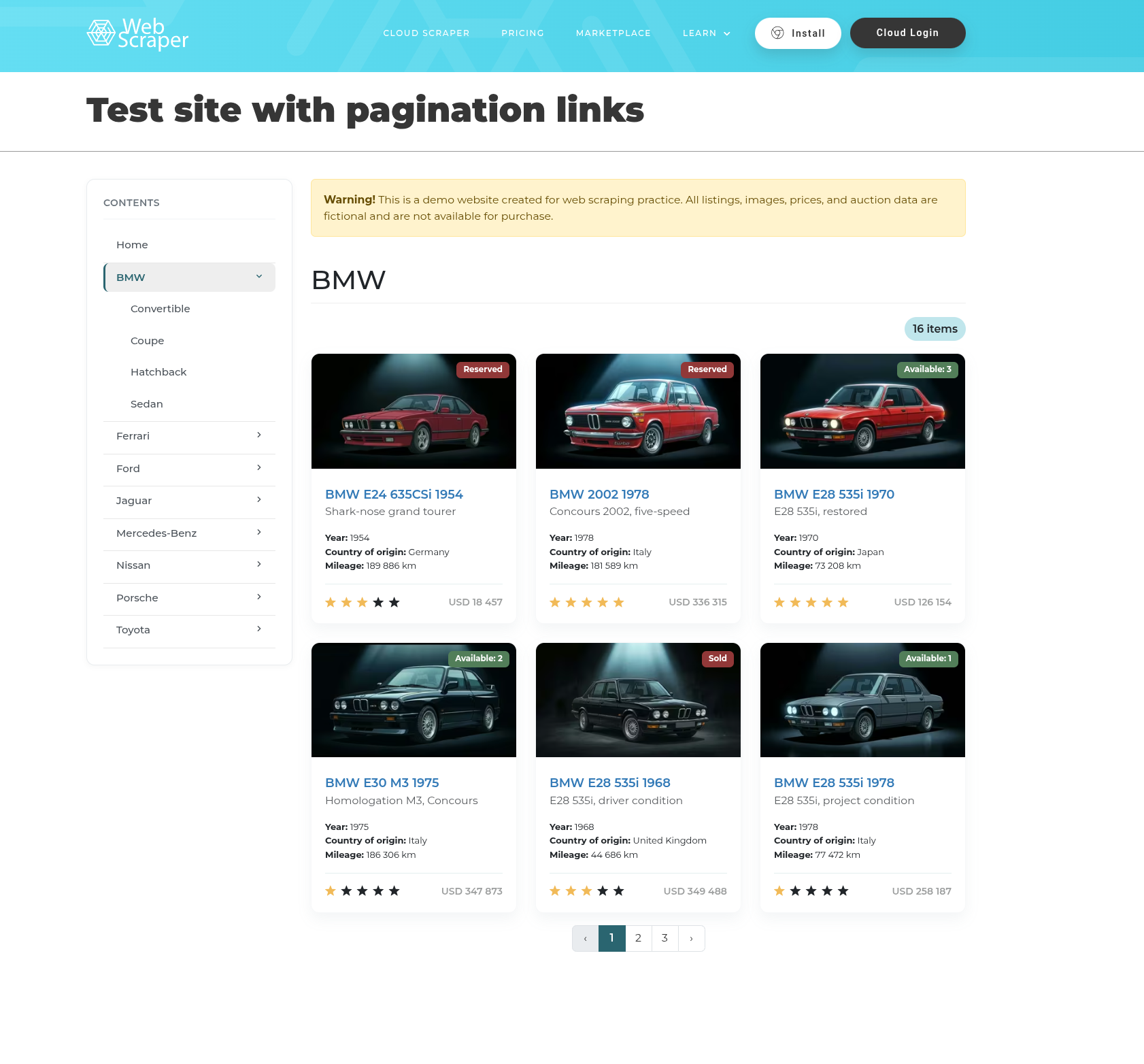
Same layout, different path suffix — exactly what --search-filters is for: the positional URL is the base, and each filter contributes a url_sufix plus tag keys stamped onto every item from that page. Generate the robot:
docker compose run --rm artisan datahelm:scrap:generate \
  "https://webscraper.io/test-sites/pagination" \
  --get-detail=true \
  --get-primary-image=true --hash-names=true \
  --robot-name=webscraper.io \
  --search-filters='[{"url_sufix":"BMW","category":"carros","BMW":60},{"url_sufix":"Ferrari","category":"Ferrari","limit":60},{"url_sufix":"Jaguar","category":"Jaguar","limit":60}]'
· Auto-selected transport: guzzle (baked into the robot).
· Crawling 3 search filter(s) (baked into the robot).
· Safety cap: max_items = 240 (2× the per-category limits; applies in HTML and API mode).
· Auto-enabled dedup on "link" (pass --no-dedup to disable).
· Transport 'guzzle' succeeded.
Robot command written to app/Console/Commands/RobotsCommand/RobotWebscraperIo.php
Run it with: php artisan datahelm:robot:webscraperio
Look closely at the first filter — it contains a typo we'll meet again in Step 4: {"url_sufix":"BMW","category":"carros","BMW":60} says "BMW": 60 where it meant "limit": 60. The generator can't know that's a mistake: any key besides url and limit is, by design, a tag copied onto every item. It even shows up in the console note — max_items = 240 is 2× the per-category limits, and only Ferrari's and Jaguar's 60s were recognised (2 × 120). Keep going; the output will expose it.
Step 2 — Read the blueprint
Open the generated RobotWebscraperIo.php — the blueprint is embedded in the file. The parts worth reading:
{
  "url": "https://webscraper.io/test-sites/pagination",
  "item_selector": "div.card.sitemap-card.test-sites-card",
  "scrape_detail": true,
  "pagination": { "strategy": "link_list", "css": "ul.pagination a" },
  "detail_link_field": "link",
  "fields": [
    { "name": "link",  "css": "a.card-head-url", "attribute": "href" },
    { "name": "image", "css": "img.img-fluid.card-img-top.image.img-responsive", "attribute": "src" },
    { "name": "year",              "css": "", "label": "Year" },
    { "name": "country_of_origin", "css": "", "label": "Country of origin" },
    { "name": "mileage",           "css": "", "label": "Mileage" }
  ],
  "detail_fields": [
    { "name": "price", "css": "div.container.test-sites-cars.item-page",
      "regex": "/[\\d.,]+\\s*(?:USD|CAD|AUD|EUR|GBP|BRL|JPY|CNY|INR|MXN)/i" },
    { "name": "description",  "css": "p.description.mt-5" },
    { "name": "transmission", "css": "", "label": "Transmission" },
    { "name": "make",         "css": "", "label": "Make" },
    { "name": "model",        "css": "", "label": "Model" },
    { "name": "engine",       "css": "", "label": "Engine" },
    { "name": "power",        "css": "", "label": "Power" }
  ],
  "search_filters": [
    { "url_sufix": "BMW",     "category": "carros", "BMW": 60 },
    { "url_sufix": "Ferrari", "limit": 60, "category": "Ferrari" },
    { "url_sufix": "Jaguar",  "limit": 60, "category": "Jaguar" }
  ]
}
(Trimmed — the real blueprint detected a dozen more detail fields.)
| Key | What the detector found | Why |
|---|---|---|
pagination.strategy | link_list (ul.pagination a) | Numbered page links (1 · 2 · 3), not a "next »" link — contrast with the books tutorial's next_link |
fields[] with label | Year, Country of origin, Mileage | The car cards and spec sheets are label: value rows sharing the same CSS, so they're matched by label text. See Label-based fields |
detail_fields[] | make, model, engine, power, … | --get-detail=true visited a sample car and detected its spec sheet — generously; delete what you don't need |
search_filters | three entries | Baked in from the CLI; the crawl visits each suffix and stamps its tags onto the items |
Step 3 — Run it
docker compose run --rm artisan datahelm:robot:webscraperio
fetching: https://webscraper.io/test-sites/pagination/BMW
fetching: https://webscraper.io/test-sites/pagination/BMW?page=2
fetching: https://webscraper.io/test-sites/pagination/BMW?page=3
fetching: https://webscraper.io/test-sites/pagination/Ferrari
fetching: https://webscraper.io/test-sites/pagination/Ferrari?page=2
fetching: https://webscraper.io/test-sites/pagination/Ferrari?page=3
fetching: https://webscraper.io/test-sites/pagination/Jaguar
fetching: https://webscraper.io/test-sites/pagination/Jaguar?page=2
fetching: https://webscraper.io/test-sites/pagination/Jaguar?page=3
Saved 42 item(s) to storage/app/scrapes/webscraperio.json

--- Crawl stats ---
  Items scraped : 42 in 17s (2.4/s)
  Pages         : 9 fetched, 0 failed
  Detail pages  : 42 fetched, 0 failed
One robot, three categories, three pages each, plus a detail-page visit per car. The photos landed too — 42 .avif files under storage/app/scrapes/images/webscraper.io/, renamed to content hashes because of --hash-names=true.
Step 4 — Read the output critically
Here's a real item from that first run — with three things to notice:
{
  "link": "https://webscraper.io/test-sites/product/bmw-e24-635csi-1954-c002",
  "title": "Test Site Product",
  "year": "1954",
  "country_of_origin": "Germany",
  "mileage": "189 886 km",
  "category": "carros",
  "BMW": 60,
  "price": ". USD",
  "make": "BMW",
  "model": "E24 635CSi",
  "engine": "I4",
  "power": "122 HP",
  "primary_image": "https://webscraper.io/images/test-sites-cars/BMW-E24-635CSi-1954-1-thumbnail.avif",
  "image_path": "scrapes/images/webscraper.io/1c358f57915db1e76d18b0069c15a948cde281ef.avif"
}
1. "BMW": 60 is a field on every BMW item. There's the Step 1 typo: because every filter key besides url and limit becomes an item tag, the misspelled limit turned into data — and BMW crawled uncapped. Fix the filter in the blueprint (and make the category value consistent while there):
{ "url_sufix": "BMW", "limit": 60, "category": "BMW" }
2. "price": ". USD" is garbage. The detector pointed the price at the whole page container and trusted a currency regex — which matched the wrong fragment. When a regex-over-a-container misfires, point the field at the real element instead. On the detail page the price is:
<h3 class="price float-end" itemprop="price">
  <span class="amount" data-price="18457">18 457</span>
That data-price attribute is a gift — machine-readable, no thousands-separator cleanup:
{ "name": "price", "css": "h3.price span.amount", "attribute": "data-price", "regex": null }
3. "title": "Test Site Product" — on every car. Not a bug in the crawler: the sandbox really does give every product that generic <h1>. The car's identity lives in the labelled make / model / year fields, so delete the redundant title from fields[] and detail_fields[].
Step 5 — Re-run
Selectors and filters are just data in the embedded BLUEPRINT JSON — edit and re-run, no re-generation:
docker compose run --rm artisan datahelm:robot:webscraperio
The same item, after the fixes:
{
  "link": "https://webscraper.io/test-sites/product/bmw-e24-635csi-1954-c002",
  "year": "1954",
  "country_of_origin": "Germany",
  "mileage": "189 886 km",
  "category": "BMW",
  "price": "18457",
  "make": "BMW",
  "model": "E24 635CSi",
  "engine": "I4",
  "drivetrain": "RWD",
  "power": "122 HP",
  "primary_image": "https://webscraper.io/images/test-sites-cars/BMW-E24-635CSi-1954-1-thumbnail.avif",
  "image_path": "scrapes/images/webscraper.io/1c358f57915db1e76d18b0069c15a948cde281ef.avif"
}
A clean numeric price, the right category tag on each item (16 BMW, 13 Ferrari, 13 Jaguar in this run), and no stray "BMW": 60. Add "item_schema": { "price": "float", "year": "int" } to get real numbers instead of strings — see Schema coercion.
Recap
# 1. one robot over three category listings, with detail pages and images
docker compose run --rm artisan datahelm:scrap:generate \
  "https://webscraper.io/test-sites/pagination" \
  --get-detail=true --get-primary-image=true --hash-names=true \
  --robot-name=webscraper.io \
  --search-filters='[{"url_sufix":"BMW","category":"BMW","limit":60},{"url_sufix":"Ferrari","category":"Ferrari","limit":60},{"url_sufix":"Jaguar","category":"Jaguar","limit":60}]'

# 2. run it
docker compose run --rm artisan datahelm:robot:webscraperio
And the lessons this site teaches that the sandboxes before it couldn't:
--search-filtersfans one blueprint across category URLs, tagging every item — and any key besidesurlandlimitbecomes a tag, typos included. Read your first items.- Numbered pagination is the
link_liststrategy (the books site's "next »" wasnext_link). - A regex over a big container is fragile; prefer pointing the field at the precise element — and grab a
data-*attribute when the site offers one.
Where to go deeper: Multiple categories · Generate a blueprint · Images · Robots.
Next, scrape a page that isn't a list → — single-page mode on the Wikimedia Commons Main Page, from raw <body> scrape to a clean three-field record.