

Tutorial: scraping quotes.toscrape.com
quotes.toscrape.com is the second official scraping sandbox. It's richer than the books site because it ships several variants of the same data — plain HTML, JavaScript-rendered, infinite scroll, login-gated — which makes it ideal for learning the parts of DataHelm Crawler that go beyond a simple static list:
- The plain list — and how to fix a selector the detector gets wrong.
- The infinite-scroll / JavaScript variant — auto-detected via a headless browser.
- Its JSON API — the fast way, plus a common pagination gotcha.
All output below is real.
TIP
In the Docker stack, prefix each command with docker compose run --rm.
Part 1 — The plain HTML list
Each quote on the homepage is a <div class="quote"> containing the text, the author, and a list of tags. Note the "Top Ten tags" box in the right sidebar — it's about to matter:
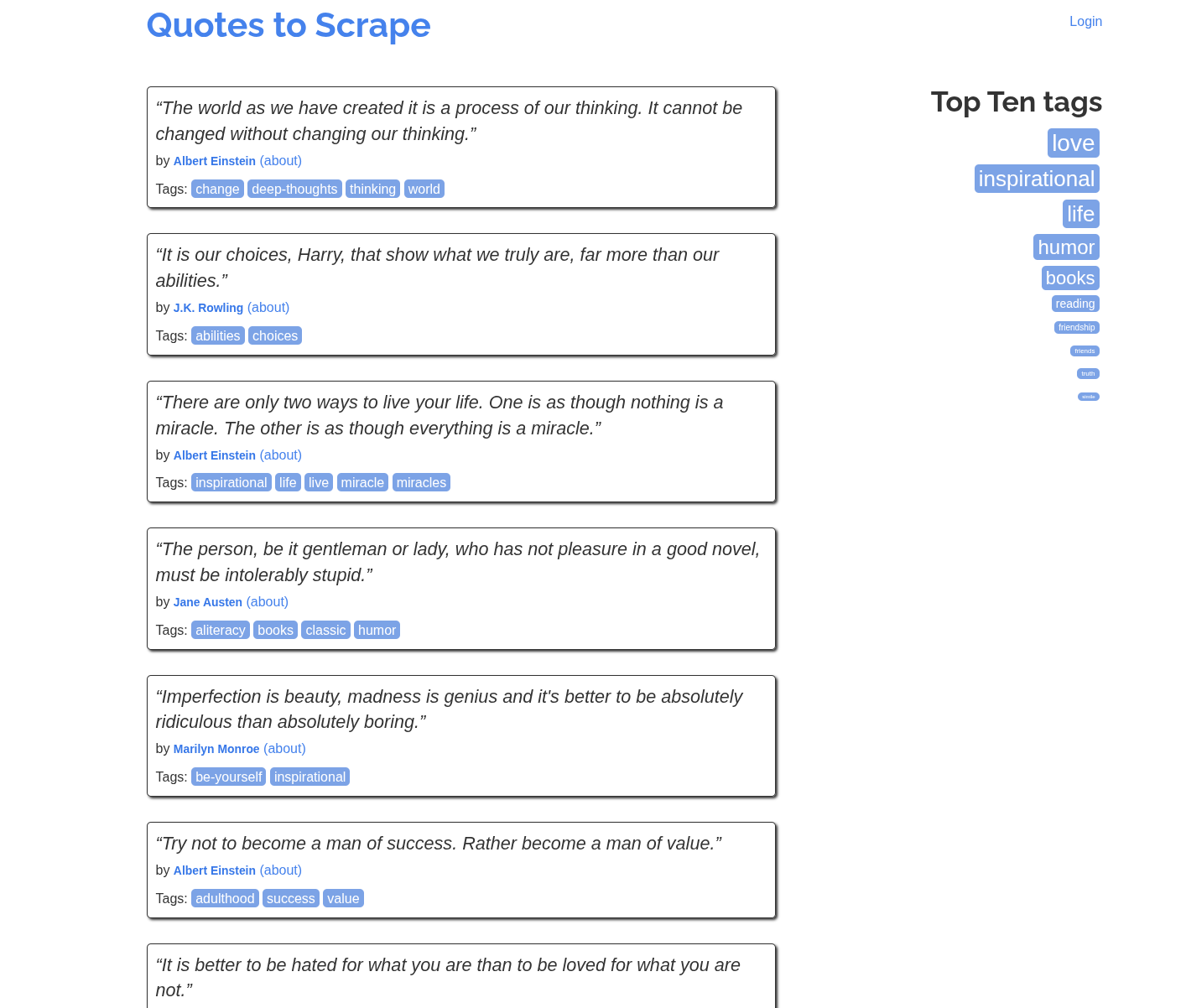
Start by generating a blueprint:
php artisan datahelm:scrap:generate "https://quotes.toscrape.com/" --json
· Auto-selected transport: guzzle (baked into the robot).
· Transport 'guzzle' succeeded.
{
  "item_selector": "span.tag-item",
  "pagination": { "strategy": "next_link", "css": "li.next a" },
  "fields": [
    { "name": "link",  "css": "a.tag", "attribute": "href" },
    { "name": "title", "css": "a.tag", "attribute": null }
  ]
}
When auto-detection picks the wrong list
The detector chose span.tag-item — the "Top Ten tags" box in the sidebar, not the quotes. That box is a cleaner repeating list (uniform links), so the heuristics scored it highest. This is normal: auto-detection is a starting point, not an oracle. The blueprint is just data — fix it.
The real content is div.quote. Rather than hand-write the JSON blind, confirm your selectors in the selector shell first:
php artisan datahelm:scrap:shell https://quotes.toscrape.com/
> div.quote                # 10 matches — good, that's the quotes
> div.quote span.text      # the quote text
> div.quote small.author   # the author
> div.quote div.tags a.tag # the tags (multiple)
Now write the corrected blueprint to storage/app/blueprints/quotes.toscrape.com.json:
{
  "url": "https://quotes.toscrape.com/",
  "mode": "html",
  "item_selector": "div.quote",
  "scrape_detail": false,
  "pagination": { "strategy": "next_link", "css": "li.next a" },
  "fields": [
    { "name": "text",        "css": "span.text",      "type": "css", "attribute": null,   "multiple": false },
    { "name": "author",      "css": "small.author",   "type": "css", "attribute": null,   "multiple": false },
    { "name": "author_link", "css": "span a",         "type": "css", "attribute": "href", "multiple": false },
    { "name": "tags",        "css": "div.tags a.tag", "type": "css", "attribute": null,   "multiple": true }
  ],
  "dedup": { "enabled": true, "key_field": "text" }
}
Two things worth noting:
"multiple": trueontagscollects every matching element into an array, instead of just the first.dedup.key_fieldistext, notlink— quotes have no detail URL, so we dedup on the quote text itself.
Run it:
php artisan datahelm:scrap:run quotes.toscrape.com --limit=3 --output=-
{
  "text": "“The world as we have created it is a process of our thinking. It cannot be changed without changing our thinking.”",
  "author": "Albert Einstein",
  "author_link": "/author/Albert-Einstein",
  "tags": ["change", "deep-thoughts", "thinking", "world"]
}
The crawler follows li.next a through all 10 pages for the full set of 100 quotes.
Part 2 — The JavaScript / infinite-scroll variant
https://quotes.toscrape.com/scroll renders the same quotes, but the initial HTML is an empty shell — the quotes are fetched by JavaScript as you scroll. A plain HTTP fetch sees only:
Quotes to Scrape … Login … Loading… … Quotes by: GoodReads.com
Point the generator at it with the auto transport (the default), which will detect the empty shell, render it in a headless browser, and look again:
php artisan datahelm:scrap:generate "https://quotes.toscrape.com/scroll" --json
· Transport 'guzzle' succeeded.
· Rendered in a headless browser and captured 1 JSON response(s) from its network activity.
· Headless re-render exposed a real content list — building an HTML-mode robot (render_js baked in).
· The page also calls a JSON API (https://quotes.toscrape.com/api/quotes, 10 records/page).
  If it holds the same items, re-run with --api-endpoint=https://quotes.toscrape.com/api/quotes
  for a faster API-mode robot.
Two things happened automatically:
- The crawler recognised the page as JavaScript-rendered, rendered it with the browser transport, re-detected the list, and baked
render_js: trueinto the blueprint so every run renders it too. - While rendering, it sniffed the network traffic and spotted the JSON endpoint the page calls — and told you about it, because hitting the API directly is far faster than rendering a browser on every page.
Requires a browser transport
The headless-render step needs the browser transport available (browserless). In the reference Docker stack it's already running. See HTTP transports to enable it, or skip straight to the API approach below — which needs no browser at all.
Part 3 — Scraping the JSON API directly
The generator told us the page is backed by https://quotes.toscrape.com/api/quotes. Let's build a pure API-mode blueprint from it — no browser, no HTML parsing. The --api-items-path tells the crawler where the records live in the JSON response:
php artisan datahelm:scrap:generate "https://quotes.toscrape.com/scroll" \
  --api-endpoint="https://quotes.toscrape.com/api/quotes" \
  --api-items-path=quotes \
  --json
The API returns { "has_next": true, "page": 1, "quotes": [ … ] }, so the record array is at quotes. The blueprint:
{
  "mode": "api",
  "api": {
    "endpoint": "https://quotes.toscrape.com/api/quotes",
    "method": "GET",
    "items_path": "quotes",
    "page_param": "page",
    "start_page": 0
  },
  "fields": [
    { "name": "tags", "css": "tags", "type": "json", "multiple": true },
    { "name": "text", "css": "text", "type": "json" }
  ]
}
In API mode, a field's css is a dot-path into the JSON record (type: "json"), not a CSS selector. tags is an array, so it's "multiple": true.
Gotcha: 1-indexed pagination
If you run this as-is you get zero items. Why? The generator defaults start_page to 0, but this API is 1-indexed — ?page=0 returns an empty quotes array, so the crawler thinks it has reached the end on the first request:
curl "https://quotes.toscrape.com/api/quotes?page=0"   # → "quotes": []
curl "https://quotes.toscrape.com/api/quotes?page=1"   # → 10 quotes
The fix is a one-line blueprint edit — set start_page to 1 and add the nested author.name path while you're there:
{
  "mode": "api",
  "api": {
    "endpoint": "https://quotes.toscrape.com/api/quotes",
    "method": "GET",
    "items_path": "quotes",
    "page_param": "page",
    "page_size": 10,
    "start_page": 1
  },
  "fields": [
    { "name": "text",   "css": "text",        "type": "json", "multiple": false },
    { "name": "author", "css": "author.name", "type": "json", "multiple": false },
    { "name": "tags",   "css": "tags",        "type": "json", "multiple": true }
  ],
  "dedup": { "enabled": true, "key_field": "text" }
}
Save it as storage/app/blueprints/quotes-api.json and run:
php artisan datahelm:scrap:run quotes-api --limit=4 --output=-
{ "text": "“The world as we have created it is a process of our thinking…”", "author": "Albert Einstein", "tags": ["change", "deep-thoughts", "thinking", "world"] }
{ "text": "“It is our choices, Harry, that show what we truly are…”",         "author": "J.K. Rowling",   "tags": ["abilities", "choices"] }
{ "text": "“There are only two ways to live your life…”",                     "author": "Albert Einstein", "tags": ["inspirational", "life", "live", "miracle", "miracles"] }
{ "text": "“The person, be it gentleman or lady, who has not pleasure in a good novel…”", "author": "Jane Austen", "tags": ["aliteracy", "books", "classic", "humor"] }
The crawler walks page=1, 2, 3… until the API returns an empty page.
Which approach should I use?
| Approach | When | Trade-off |
|---|---|---|
| Plain HTML list (Part 1) | Content is in the server HTML | Simplest; no browser needed |
render_js HTML (Part 2) | Content is JS-rendered and there's no clean API | Correct, but renders a browser per page — slow |
| API mode (Part 3) | The page is backed by a JSON endpoint | Fastest and most robust; watch pagination params |
The generator picks a sensible default for you and, when it renders a JS page, tells you if a faster API exists — you decide whether to switch.
What you learned
- Auto-detection is a starting point — inspect and fix the
item_selector/fields when needed. - The selector shell confirms selectors before you edit a blueprint.
- The
autotransport handles JavaScript pages by rendering them, and surfaces any API it sees. - API mode maps JSON dot-paths to fields; mind the
start_page/ pagination parameters.
See also: JavaScript sites & JSON APIs · Infinite scroll · HTTP transports
Next, scrape webscraper.io → — one robot over three car-brand categories, with detail pages, images, and a --search-filters gotcha caught in the output.