

Tutorial: scraping books.toscrape.com
books.toscrape.com is a sandbox built specifically for practising web scraping — a paginated catalogue of 1,000 books with a detail page for each. It's static HTML with no bot protection, so it's the perfect first crawl. By the end of this tutorial you'll have generated a blueprint, inspected and understood every part of it, run a real scrape, saved a reusable robot, and downloaded the cover images.
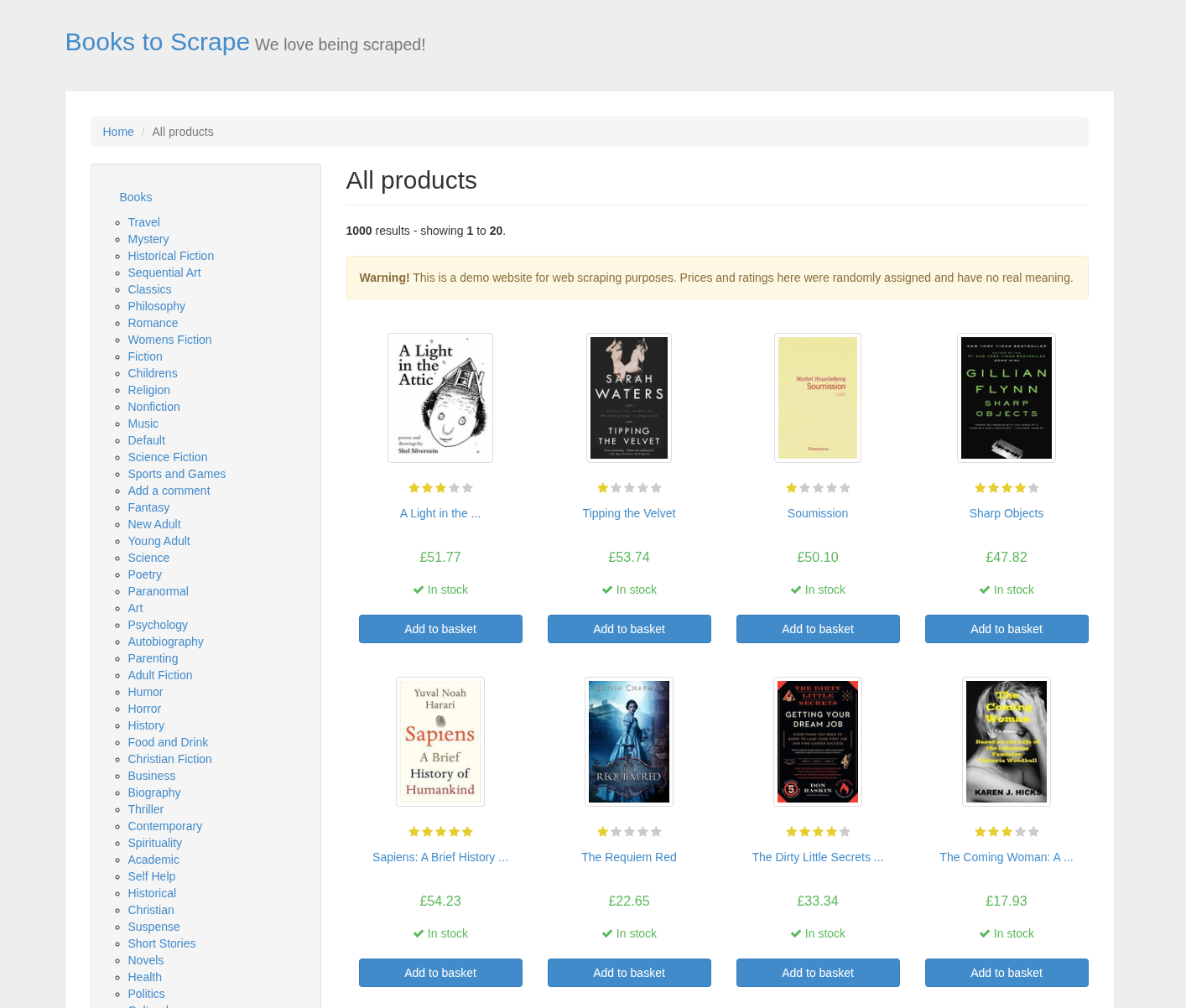
Everything below is real output from running the commands against the live site.
Docker vs. local
If you use the reference Docker stack, prefix every php artisan … with docker compose run --rm:
docker compose run --rm artisan datahelm:scrap:generate https://books.toscrape.com/ --get-detail=true
The rest of this page uses the bare php artisan … form for brevity.
Step 1 — Generate a blueprint
Point the generator at the catalogue and ask it to also inspect a book's detail page (--get-detail=true). Add --json to print the blueprint instead of scaffolding a robot, so we can read it first:
php artisan datahelm:scrap:generate "https://books.toscrape.com/" --get-detail=true --json
It fetches the page, detects the repeating item, the pagination and the fields, and prints:
· Auto-selected transport: guzzle (baked into the robot).
· Auto-enabled dedup on "link" (pass --no-dedup to disable).
· Transport 'guzzle' succeeded.
followed by the blueprint JSON. The important parts:
{
  "url": "https://books.toscrape.com/",
  "mode": "html",
  "item_selector": "article.product_pod",
  "scrape_detail": true,
  "pagination": { "strategy": "next_link", "css": "li.next a" },
  "detail_link_field": "link",
  "fields": [
    { "name": "link",  "css": "a",             "attribute": "href" },
    { "name": "title", "css": "h3",            "attribute": null },
    { "name": "image", "css": "img.thumbnail", "attribute": "src" },
    { "name": "price", "css": "p.price_color", "attribute": null }
  ],
  "detail_fields": [
    { "name": "title",       "css": "h1" },
    { "name": "description",  "css": "p" },
    { "name": "upc",             "label": "UPC" },
    { "name": "product_type",    "label": "Product Type" },
    { "name": "price_excl_tax",  "label": "Price (excl. tax)" },
    { "name": "price_incl_tax",  "label": "Price (incl. tax)" },
    { "name": "tax",             "label": "Tax" },
    { "name": "availability",    "label": "Availability" },
    { "name": "number_of_reviews", "label": "Number of reviews" }
  ],
  "dedup": { "enabled": true, "key_field": "link" }
}
Reading the blueprint
| Key | What the detector found | Why |
|---|---|---|
item_selector | article.product_pod | Each book card on the grid is an <article class="product_pod"> |
pagination.strategy | next_link (li.next a) | The catalogue uses a "next »" link at the bottom |
fields[].link | a → href | The card's anchor is the detail-page URL — used as detail_link_field and the dedup key |
fields[].image | img.thumbnail → src | The cover thumbnail |
detail_fields with label | e.g. "label": "UPC" | The detail page's "Product Information" table is a list of label → value rows that share the same CSS, so they're matched by label text, not by a CSS selector. See Label-based fields |
Notice the generator was generous — it detected title, price and description on both the list and the detail page. Keep whichever copy you prefer and delete the other. The description field here is p — the first paragraph on the detail page, which happens to be the price line; you'd change its selector to #product_description + p to grab the real synopsis (see Refining fields below).
Step 2 — Save a reusable blueprint
By default, datahelm:scrap:generate scaffolds a PHP robot (covered in Step 5). To save a plain reusable JSON blueprint instead — so you can run it by host name — pass --blueprint:
php artisan datahelm:scrap:generate "https://books.toscrape.com/" \
  --get-detail=true \
  --get-primary-image=true \
  --hash-names=true \
  --blueprint
Blueprint books was created.
Saved to storage/app/blueprints/books.toscrape.com.json
The file is saved under the host name, so you can now refer to it as books.toscrape.com.
Step 3 — Run the scrape
Run the saved blueprint. --limit=3 stops after three items, and --output=- prints to stdout instead of writing a file:
php artisan datahelm:scrap:run books.toscrape.com --limit=3 --output=-
Real output (first item):
{
  "link": "https://books.toscrape.com/catalogue/a-light-in-the-attic_1000/index.html",
  "title": "A Light in the Attic",
  "image": "https://books.toscrape.com/media/cache/2c/da/2cdad67c44b002e7ead0cc35693c0e8b.jpg",
  "price": "£51.77",
  "upc": "a897fe39b1053632",
  "product_type": "Books",
  "price_excl_tax": "£51.77",
  "price_incl_tax": "£51.77",
  "tax": "£0.00",
  "availability": "In stock (22 available)",
  "number_of_reviews": "0",
  "primary_image": "https://books.toscrape.com/media/cache/2c/da/2cdad67c44b002e7ead0cc35693c0e8b.jpg"
}
Every field from the list and the detail page is merged into one record. Because --get-primary-image=true was set, the crawler also resolved a primary_image URL.
Drop --limit to crawl the whole catalogue — the crawler follows li.next a through all 50 pages and dedups on link:
php artisan datahelm:scrap:run books.toscrape.com
# → storage/app/scrapes/books.toscrape.com.json  (1000 books)
Step 4 — Refine a selector
The auto-detected description grabbed the wrong paragraph. Open storage/app/blueprints/books.toscrape.com.json and point it at the real synopsis, which on the detail page lives in the paragraph right after #product_description:
{ "name": "description", "css": "#product_description + p", "type": "css", "attribute": null }
Re-run — no re-generation needed, the blueprint is just data:
php artisan datahelm:scrap:run books.toscrape.com --limit=1 --output=-
"description": "It's hard to imagine a world without A Light in the Attic. This now-classic collection of poetry and drawings from Shel Silverstein celebrates its 20th anniversary…"
Selector shell
Not sure which selector to use? Test it live against the page without editing the blueprint:
php artisan datahelm:scrap:shell https://books.toscrape.com/catalogue/a-light-in-the-attic_1000/index.html
> #product_description + p
See Selector shell.
Step 5 — Scaffold a robot
For a site you'll scrape repeatedly, bake the blueprint into a first-class Artisan command. This is the default action (no --blueprint), so just add --robot-name:
php artisan datahelm:scrap:generate "https://books.toscrape.com/" \
  --get-detail=true \
  --get-primary-image=true \
  --hash-names=true \
  --robot-name=books
Robot command written to app/Console/Commands/RobotsCommand/RobotBooks.php
Run it with: php artisan datahelm:robot:books
Now the crawl is a normal command with its blueprint embedded — commit it, schedule it, run it:
php artisan datahelm:robot:books --limit=20
The generated RobotBooks.php has a handle() closure — the per-item hook where you decide what to do with each record: write JSON (default), download images, or upsert into a model. See Robots.
Step 6 — Download the cover images
The blueprint only puts image URLs on each item; the robot's handle() closure downloads them. The scaffolded closure already does this for the primary image:
$imageUrl  = $item->get('primary_image') ?? $item->get('image');
$imagePath = is_string($imageUrl) && $imageUrl !== ''
    ? $images->store($imageUrl, $this->imageDisk, $this->imageFolder, $hashNames)
    : null;
Run the robot without --no-images and the covers land under storage/app/scrapes/images/books.toscrape.com/ with content-hash filenames (because --hash-names=true was set). Each record gains an image_path pointing at the stored file.
See Images for resizing, galleries, and choosing a disk (local, S3, GCS…).
Step 7 — Export as CSV
Any blueprint can emit CSV or JSONL instead of JSON. Set it at generate time with --output-format=csv, or edit output_config.format in the blueprint:
"output_config": { "format": "csv", "flatten": false }
php artisan datahelm:scrap:run books.toscrape.com
# → storage/app/scrapes/books.toscrape.com.csv
Recap
# 1. inspect what the detector produces
php artisan datahelm:scrap:generate "https://books.toscrape.com/" --get-detail=true --json

# 2. save a reusable blueprint (primary image, hashed filenames)
php artisan datahelm:scrap:generate "https://books.toscrape.com/" \
  --get-detail=true --get-primary-image=true --hash-names=true --blueprint

# 3. run it
php artisan datahelm:scrap:run books.toscrape.com --limit=20 --output=-

# 4. or scaffold a permanent robot
php artisan datahelm:scrap:generate "https://books.toscrape.com/" \
  --get-detail=true --get-primary-image=true --hash-names=true --robot-name=books
php artisan datahelm:robot:books
Next, scrape quotes.toscrape.com → — where you'll fix an auto-detected selector by hand and tackle a JavaScript / infinite-scroll variant of the same site.